Three Ways to Use That New Notebook to Get Your Life Together
None of which require a lot of setup, an online course, or color-coded markers.
It’s that beautiful time at the beginning of the year when even the most jaded of us has that little flame of hope deep inside saying this time. This is the year I’m going to figure it out, make it work, and finally organize my life.
Spoiler alert: you won’t. But that’s ok. Life is messy, and it’s meant to be that way. Nobody’s actually got it figured out, and everyone who seems to be making it work is really stressed about something.
When you see that ad for the latest organizer, the note-taking course that will 1000x your productivity, or the One Thing That Finally Got Me to Journal course for the low, low price of five installment payments…resist.
Or, at least, try one of these methods first.
If you clicked on this article, I’m betting it’s because at some point during the holidays someone bought you a notebook — possibly you. And I’m all in favor of that, as I’ve written about before.
Or maybe you’re reading this outside of the holidays, and you recently went down one of the junk journal/bookbinding/zine rabbit holes on YouTube and now are sitting there with a stack of very interestingly-bound notebooks of various sizes, wondering what to do with them.
The bigger either stack gets, the more intimidating they can become, to the point where instead of using them it seems easier to just make/buy another. Especially when all the bullet journal/organizer/journaling methods suggested seem overwhelming.
I want to share with you three amazingly simple and, more importantly, useful ways to use your notebooks. These are things I have used, do use, and keep coming back to regardless of whatever new method I’ve recently tried (I’m way down all three of those rabbit holes already, it’s too late for me, save yourself!!).
Joan Westenberg’s Object Pages
Joan is one of the best bloggers I’ve ever read. Her ideas and commentary regularly inspire me both in thought and action. This simple concept is no exception.
The system I’m about to share with you is built on one fundamental principle: give every thought its own space. That’s it.
And it really is it. I’m going to summarize here, but I’m hoping that just whets your appetite to read about it yourself (links below). Every new task, idea, reflection, list, whatever, all of them get a new page in your notebook, as follows:
- Header: the date, of course, and then what kind of “object” the page is. Joan suggests using task, idea, reflection, listto start but you can certainly customize it for yourself.
- Status: Active, completed, or Saved. In the lower left corner.
- Tags: Only two, in the center bottom of the page. Why only two? As Joan says, “ Because over-tagging is a common trap that adds complexity without adding value.”
- Priority: From 1 to 4, highest to lowest. Lower right corner.
That’s all there is to the system. If it seems too simple, that’s by design. Again, to quote Joan: “ This system isn’t about crafting a flawless record or leaving a legacy. Object Pages are for capturing the real, in-the-moment details that move you forward…”
She writes a lot more about it here:
https://medium.com/westenberg/object-pages-a-free-simple-physical-notes-system-833540483608
…and while it is a long article, it’s a lot shorter and easier to implement than a Bullet Journal, Getting Things Done, or any number of other systems.
Getting Sh*t Done with Bill Westerman
There’s nothing inherently wrong with David Allen’s famous “Getting Things Done” system — if it works for you. But like the Bullet Journal and many other complex systems, you often find yourself spending more time working on the system than you do actually, well, getting things done.
Worse, when life inevitably gets in the way of maintaining the system, you feel like you not only haven’t gotten things done (whether that’s true or not) and also you have one more thing to get done: catch up on your Getting Things Done system.
Many years ago, Bill Westerman called his own much simpler, bare-bones task management system “Getting Shit Done.” It caught on, especially with the notebook crowd, and it’s still the method I use with my own lists, whether they are stand-alone or part of a bigger system I’m experimenting with.
It's quick, it's dirty, and it works. Let's get started! — Bill Westerman, Getting Sh t Done
Before I summarize the three steps in Bill’s system, there’s one thing to get clear: it’s task management, not project management. A project is build a community about making and using notebooks. A task is write an article about three easy ways to use notebooks to organize your life. You can start tasks easily because it’s clear what to do: sit at the keyboard. Open a new document. Start typing. If you don’t have a clear definition of “done”, it’s probably not a task — so break it down until you do.
Got it? Great. Then here’s the three steps, summarized.
- Make a list of tasks: Wondering what to put on the list? That’s up to you — Bill would “ …create a stream-of-consciousness list of everything I can remember that needs to be done. It doesn’t need to be comprehensive, and I don’t worry about prioritizing or organizing.”Then he suggests you put a box in front of each task.*
- Do the tasks: Seems kind of obvious, I know, but with the plethora of tagging, dating, prioritizing, and other meta-labels often involved in other task-management systems (especially electronic ones), this kind of gets overlooked. There is one thing that’s special, though, which is the way you mark the tasks off as you do them:
1. A dot • in the box makes it URGENT.2. A slash / in the box means it’s been moved to another list.3. A check ✔️ is task completed: HURRAY!4. An X is task cancelled. BIGGER HURRAY!5. Another box next to the box means the task has a follow-up.He recommends you start by only putting dots in three or four of the tasks on your list; when they’re done, you can always • the next-most-urgent, but picking only three will keep you focused. - Create a backlog/parking/garden** list: There are always tasks that need doing but can’t be done today. Creating a different list with these tasks makes sure you don’t forget about them, especially since the next time you start step one (remember? Make a list) you’ll check your backlog to see if any of those items should be in your Today Tasks.
Of course there’s more to it than just this, but honestly, not much. You can read his plain English short version or the full article.
(And if you do read the latter, you should know that when I started thispiece I did not know about his final footnote and quote — but I was absolutely thrilled when I saw it.)
Ten Images with Ash Parsons Story
I learned about this ritual from the Book of Alchemy by Suleika Jaquad(not an affiliate link) where it is one of a hundred different journaling prompts, intended to be done once per day.
Confession: I made it to day five before life got in the way.
But that’s the beauty of this particular prompt. Ash came up with it after having her first child, discovering that the time she used to spend writing long, eloquent entries in her journal was now occupied by the needs of her newborn.
But what she did find time to do was just sit down briefly in the evenings and write down ten images from her day. Not entries, not even full sentences, just impressions as they came to her.
Ten might even be too much. I like to fold a little zine with six pages inside, one for each memory. Today’s might be something like:
- stacking the chairs in the studio after the social
- looking at pictures of the Bloomchaser’s game from last night
- the yarn bowl I made Natasha
- the yellow stationery set I made Johanna
- Jennifer laughing on the video call
- Harvey sleeping on the couch
I don’t have to do anything with those memories — but I could. They could be sketches. They could be shaped into a poem. But Ash says it best:
"The value doesn't lie in the image, but my attention to it. Sometimes one of those images jumps out at me and says, "Let's go somewhere together..." and I find myself writing an entire chapter or essay.
But most of the time I look at my list and exhale with a great sense of accomplishment: I have lived another day. I have seen what I've seen. And I have given my life a voice by writing it down."
One last thing.
Astute readers will note that it’s entirely possible to combine all three of these systems: make a List object page with tasks including a little square that says “do ten images” that you can check off after you have ten little sentence fragments on a Reflection page — at which point you get to check the box because that sh*t got done!
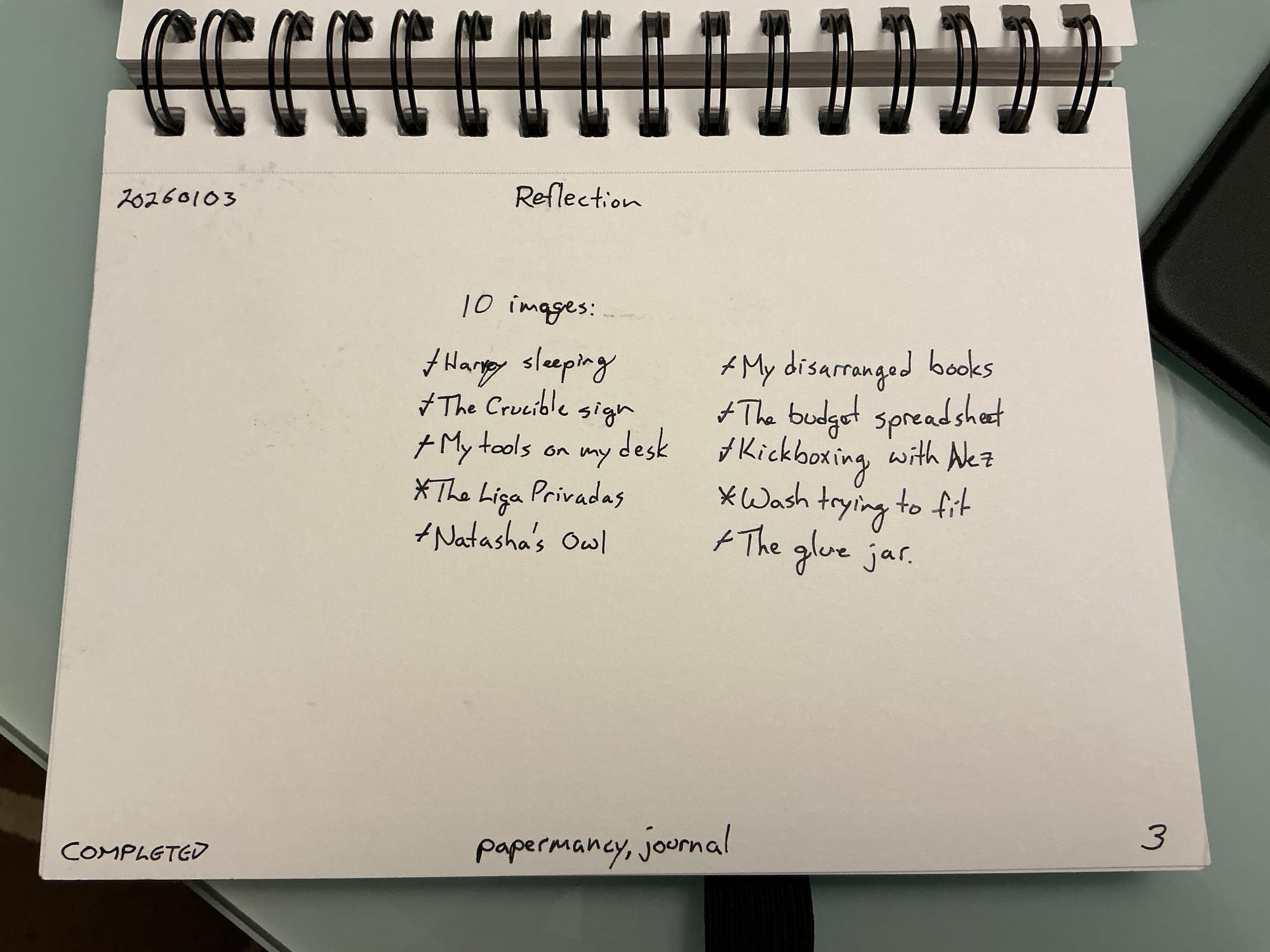
There is one element, though, that I find doesn’t get mentioned in these systems. Maybe it’s because the Joan and Bill and Ash already have it figured out, but I’ve always had difficulty with it, and so this is a reminder for myself as much as you:
Spend time looking at your notes.
Maybe chain it to some habit you already have nailed down — look at them during your first cup of coffee, or put it next to the remote control with the internal rule Must look at one page before turning on TV.
However you do it, while there is some value in just doing these things without reflection, you get a lot more benefit — the “life changing, this is what made it work, now I feel like I’m figuring it out” kind of benefit — from spending time with your past self, seeing what you’ve done, what you’ve experienced, what you’ve suffered, and what you’ve hoped.
That’s it. Grab your notebook. And let me know if you try one or three — or just tell the smart folks who thought of them.
* I use an even simpler method of a dash “—“ instead of a box, but you do you.
** Bill comes from the tech world, where “backlog” is standard terminology, and “parking” is often used in brainstorming sessions. But I’ve always preferred the term “garden”, because backlogs are stressful and nothing grows in a parking lot. Gardens, however, are where you plant the seeds that grow into bigger things.